

A new way to integrate data into AI agents
Using Fuse filesystems to get your and other data into an agent

How do you integrate AI or an AI agent with existing infrastructure, existing data sources and existing services?
Integrating services into your AI lets you do many things. You can ask the agent to
Tell me which are my most profitable customers?
What customers are going to churn in 2025?
Add a subdomain and certificate to acme.com
Make CI/CD on Github work again
Check server ‘A’ for vulnerabilities
Check my backups
There are many ways to integrate your system and third party APIs into your AI agent, three options I want to talk about are:
MCP
MCP is the default way to integrate backend services and data into your agent, enabling the agent to work with your own data and services or a third party API and data.
MCP is well understood, well supported and used by many. The downside of MCP is you need to change the agent configuration and there is no standard way of discovery for the agent to find out the capabilities of the MCP server - or find tutorials, examples and ideas.
Benefits
Standard
Well understood
Easy to integrate in AI
Easy to host as a remote service
(MCP also has a local tools mode)
Downsides
Difficult discoverability
Sometimes complicated to get working (tool me a day to get Playwright MCP working)
Need to change agent configuration
No automatic integration of different tools
CLI Client
Writing a CLI Client has been my preferred way of integrating my systems and 3rd party APIs with an AI agent. You let the AI write a small CLI client to access the data or API e.g. in Go. Then the agent can just use the CLI client to access the data, no configuration needed.
For my #CTO coaching application this looks like this (though I don’t use the client for agent integration but for my convenience in the terminal, faster than using the website):
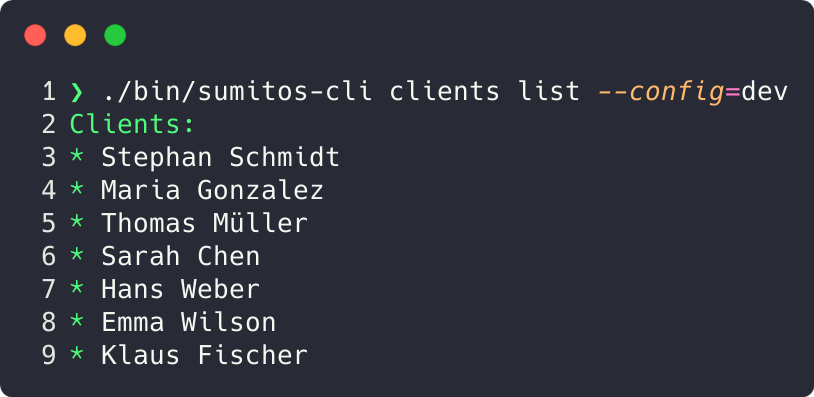
I often use CLIs as a first step to integrating external APIs. When I integrated Zoom into my coach app, I let the agent first write a CLI zoom-cli to access the Zoom API. The agent can use that to explore the data inside, gaps in the data, what to expect, edge cases, data formats (like time/date) and understand both the API and the data at the same time.
This makes the integration of an API like Zoom into an application, like my coach app, much easier for the agent. After integration, the CLI can also help the agent debug the integration if there are problems, because the CLI is easy to use for the agent, compared to driving a website.
Benefits
With
—helpthe CLI tool can give a comprehensive help for the agent, including parameters, examples how to use it, usage guidelinesCLIs have a rich parameter semantic with default —param1 p1 —param2 p2 etc.
CLIs are fast
CLIs are easy to install - no agent configuration needed
Easy to implement more complicated methods and services calls beyond CRUD
Can be used on it’s own compared to MCP
Downsides
Limited auto-discoverability for the agent
Non standard way to integrate
Remote hosting is difficult, although it can be done with SSH
Fuse
For months now the CLI approach has been my goto method of integrating data into the agents I use. Recently I’ve read an article to use a filesystem with plain file operations to do so.
I wanted to see how integrating data this way works and start some experiments.
The way to do this is using Fuse - Filesystem in Userspace. Fuse works on OS X, Linux and I use it in WSL with Windows. Fuse creates a file system in userspace as the name suggests. Which doesn’t sound exciting, but it is! This way it’s very easy to create your own file system, I use https://github.com/jacobsa/fuse to build that file system in Go. And the filesystem can be anything - a mapping to existing data or “files” and “directories” presenting other things like email. Or it can represent data as files that does not exist at all and is made up on the fly. The possibilities are limitless.
For example, as an experiment I wrote a Fuse filesystem that uses the API of my coach app to represent data as files. Fuse can represent my CTO coaching data, clients and their sessions as files - although the data is not in files at all but spread over many different tables in a Postgres database. Calling the terminal command tree on the development data, results in a tree with all the clients as directories, sessions and profile data as files.
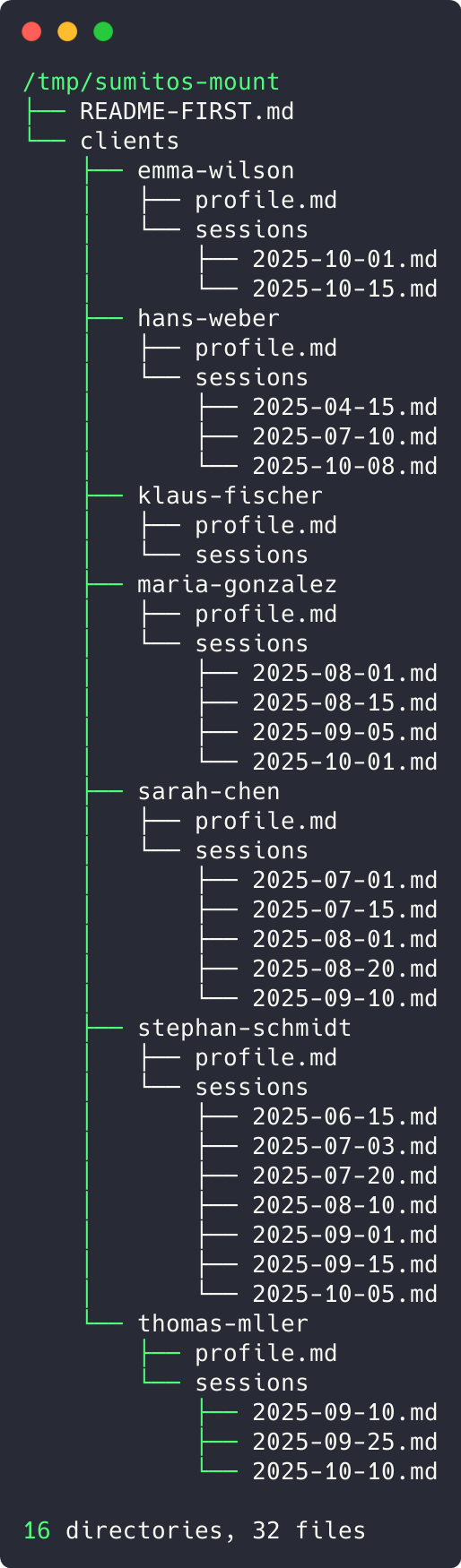
The biggest benefit of representing data and services as a file system is that the agent (Claude) can reuse all the tools it knows, grep (or ripgrep) or find (or fd) and combine them with bash commands. If I ask an agent about the clients - hypothetically, as my coach app already has a dashboard - with the most sessions, it does use bash, wc and sort to come up with an answer.

Benefits
File format can be anything depending on needs:
Markdown, CSV, or JSON. The agent will easily understand this, like CLIENTS.csv, <meeting>.md or <client>.json and use the appropriate tools (likejqfor JSON) - or even on file ending, e.g. <client>.json returns JSON and <client>.md returns Markdown and the agent decides what it finds more useful at that pointThe agent can use standard tools to analyze, explore and combine data
(bash, sort, cut)Easy discoverability
(just usels, find, grep, tree)Easy to cross link: If you have two file systems implemented this way, it’s easy to cross link between those two APIs/Data pools, just use the file path to connect them, e.g. <client>.md refers to /otherdatapool/company.md . Then the agent just reads that other file from that other path (like HTML links)
Can be used standalone and be useful, contrary to MCP
Downsides
CRUD operations are easy, service calls are more difficult
No help like with
coachapp —help
(can be done with README_FIRST.md in the file system)Non standard way to integrate
Remote hosting is possible but difficult
Conclusion
I wasn’t convinced MCP is the best tool in the past to integrate systems and I’m still not convinced it’s the best tool.
A CLI client for many situations is the better way forward, it can be used standalone and with an agent, there is more value in it. It’s easier to install and has easier discoverability compared to MCP - if you don’t need to host it as a server there is not much of a benefit. It can help you with debugging. Fuse has the benefit over a CLI client of very easy discoverability (just use find) but the downside of making actions like “new client” (create file?) much more difficult and error prone than an CLI.
I will use Fuse in the future for analytical parts, for combining different data sources inside an agent and keep using CLI clients for everything else.